
An agent can have its own addresses, such as support@ and invoices@. New mail wakes it within about a minute. It reads, answers and writes emails – always from exactly the mailbox in question. It takes attachments from the workshop, for example a document another agent built.
Set up a mailbox
In the Mailbox step when creating the agent, or later in the editor (Add mailbox; an agent can have several):
- Enter the email address. The app detects the provider and shows instructions – for Gmail, Google Workspace, iCloud, Outlook.com, GMX, WEB.DE and T-Online, each with the way to an app password.
- Enter the app password. Under Advanced you can set incoming (IMAP), outgoing (SMTP) and the sender name yourself if needed.
- Test connection checks receiving and sending separately.
An address belongs to exactly one agent. For a shared address, create an alias with your provider.
Draft or send on its own
Under When the agent writes an email:
- Drafts for approval (recommended): the agent puts a card with the finished draft in front of you – Send or Discard.
- May send on its own: the agent sends without asking.
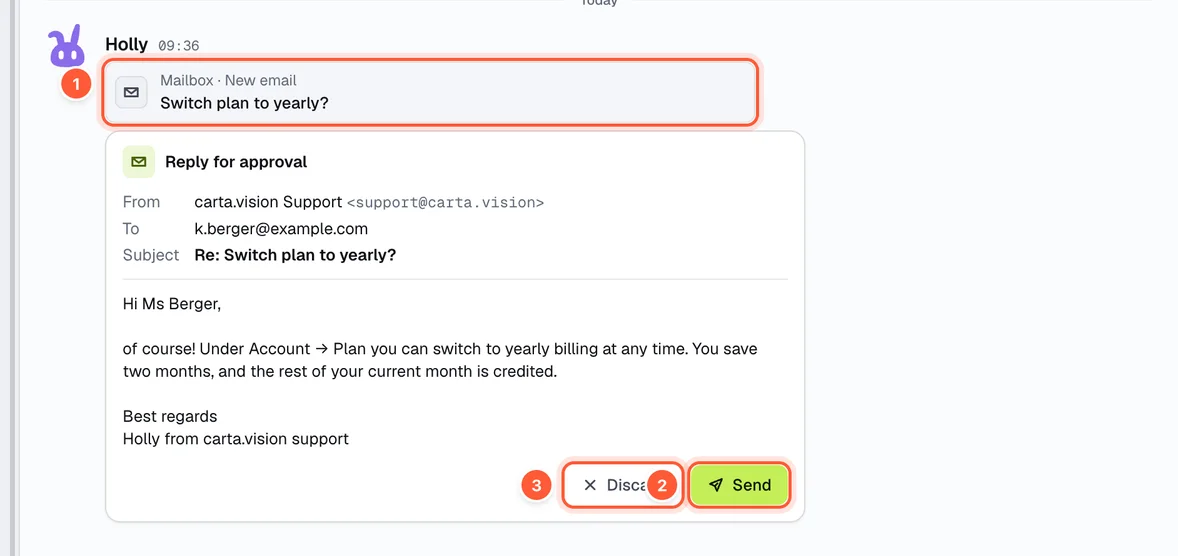
- The email that woke the agent
- Send – the reply goes out
- Discard
Plan
There is no agent mailbox on the Free plan. How many mailboxes you get depends on your plan; more are available as an add-on.