
Before anything goes to the AI model, Nema replaces names, companies, places, contact details and the terms on your list with placeholders like PER_k3x9. The answer is translated back – you read the real names again, the model never saw them. This works the same for Nema, Claude Code and Codex. Detection uses Nema Veil, our own model.
Pseudonymisation is only available in organizations. It is off until an admin or owner switches it on, and then applies to the whole organization – all agents and the chat.
Switch it on
Settings → Privacy (only visible in an organization). Set up in 1 minute leads to a fitting setup with four yes/no questions. Or one by one:
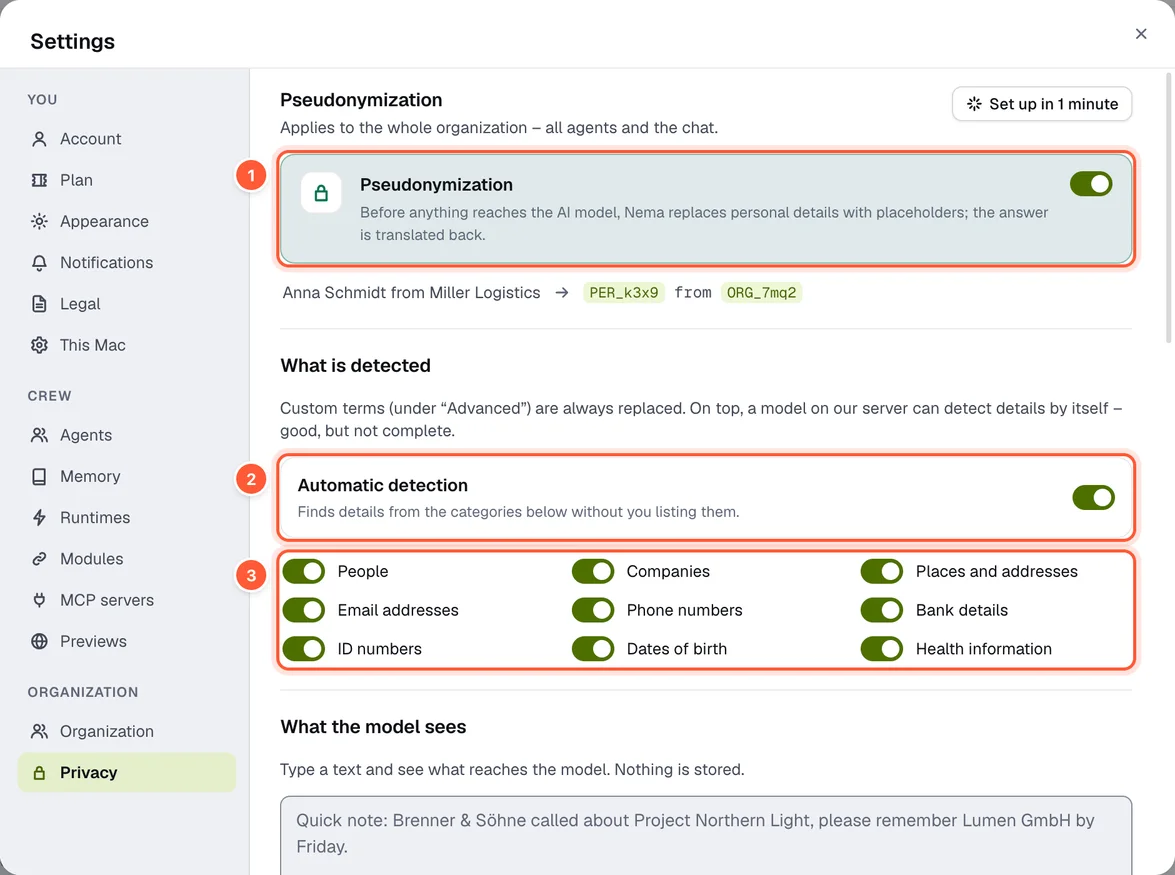
- Pseudonymization – the main switch
- Automatic detection
- The categories that are detected
- Pseudonymization – the main switch.
- Automatic detection – finds details on its own, in the categories people, companies, places and addresses, email addresses, phone numbers, bank details, ID numbers, dates of birth and health data. For this you agree once to section 7 of the terms.
- What the model sees – type a text and see what reaches the model. Nothing is stored.
- Pseudonymize images and PDFs – detected text in images and screenshots is pixelated, in PDFs covered with a box; the placeholder sits on top. While this is on, the Nema runtime does not analyse videos (they cannot be pixelated).
- Modules and MCP servers – switchable per source, with a recommendation (e.g. “Recommended: on · Delivers contact details and message contents”).
- How it is handled – what is covered in which runtime.
Members see the settings read-only. The setup agent Nema suggests privacy as the first step.
See it in the run
When Nema checks longer text, such as a tool's output, the run history shows one entry with a shield: Pseudonymizing … with the progress below (“3 of 12 text parts checked”), then Pseudonymized with the result (“4 items replaced · 2 names, 2 emails”) and the time it took. Short messages go through without an entry.
Custom terms
Under Advanced → Custom terms you add customers, products and projects that should always be replaced – even without automatic detection. Choose the kind – person, organization, place, email address, phone number, bank details, ID number, date of birth, health information, product or other, i.e. everything automatic detection knows –, enter the term, Add. Admins and owners maintain the list, in the desktop app and on iPhone. Via the menu of one of your messages (Pseudonymize …) you can take a term straight from the chat.
A custom term is marked like anything detected – tinted in the input field and in the history, with the short flicker when it appears. Nema also marks newly added terms in messages sent during the last 30 days; that takes a moment.
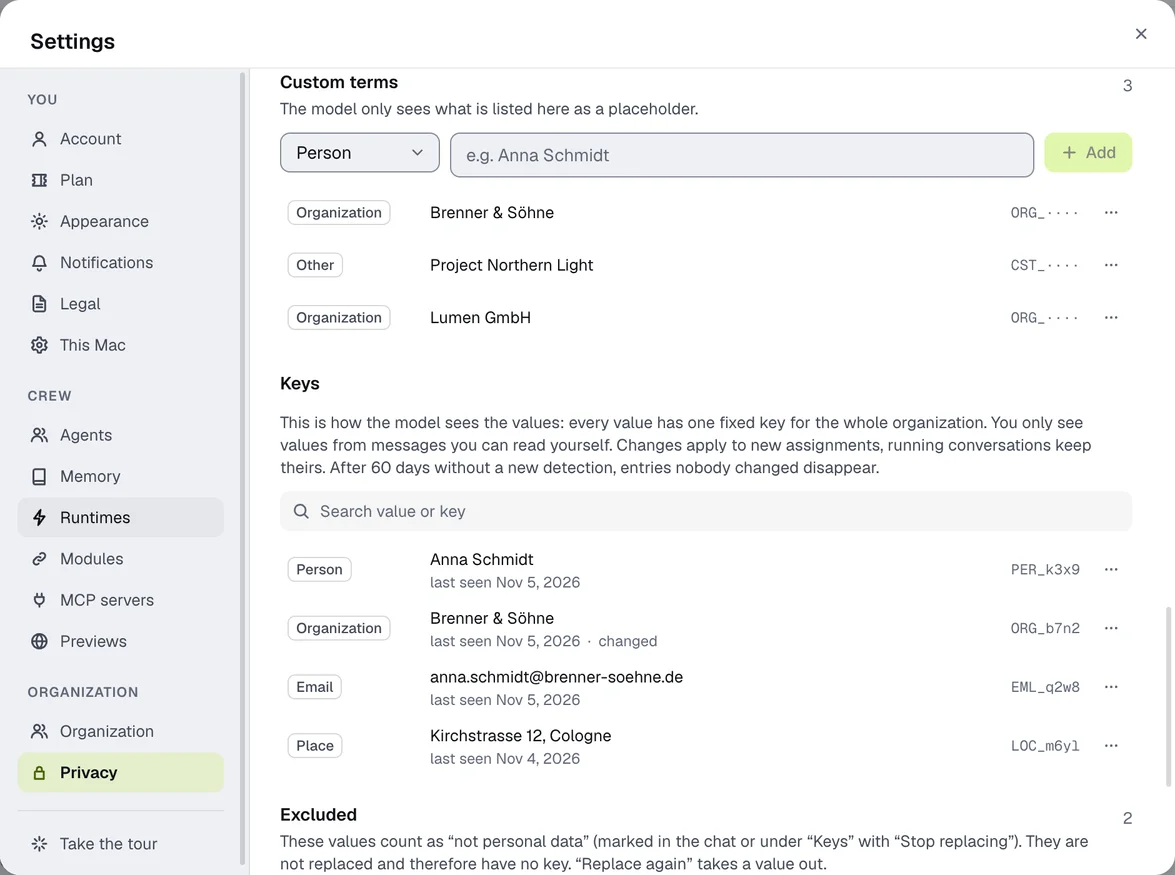
Keys shows which value has which fixed placeholder. Each value keeps its key across the whole organization; entries not detected for 60 days disappear. A search field filters by value or key; admins press Enter (Search the whole organization) to also find a value that only appeared in other people's messages, if they know it exactly. Use … at the end of a row (on iPhone: tap the row) to change type and key, remove the entry or choose Stop replacing – the value then moves to Excluded.
Exceptions: “stop replacing”
If detection replaces something that isn't personal data – your product name, say – right-click the marked spot (on the phone: press and hold the message → Edit pseudonyms, then press and hold the spot) → This is not personal data → confirm. The term is then listed under Excluded and is no longer replaced, immediately and for the whole organization. Any member may do this. Excluded values have no key and never appear under Keys; … → Replace again (on iPhone in the term's sheet) gives them their key back. Custom terms take precedence over exceptions: a custom term is always replaced and marked, even if someone excluded it before.
Clicking a marked spot toggles between the real value and the placeholder.
Field masks
Before an event from a module reaches the agent – a new email, a Slack message, a GitHub comment – you protect individual fields: Visible, Pseudonym or Hide. This always applies, even when pseudonymisation is off. Recommended setup pseudonymises names, email addresses and phone numbers. Admins set up field masks.
Where it doesn't help – honestly
- Detection doesn't find everything. What it misses goes out unchanged. Important names therefore belong in your custom terms.
- In images only text is made unrecognisable, not faces.
- Inputs to modules, tools and MCP servers go out with the real details – otherwise they couldn't work.
- Codex side calls to OpenAI, for example about the account and settings, don't go through pseudonymisation.
- There is no pseudonymisation in your personal space.
If detection is unavailable, nothing is sent: the request waits briefly and is otherwise cancelled.