
Current prices and what each plan includes are always on crew.nema.im under Pricing. The numbers there come straight from our billing system.
Plans
- Free: free forever, to get to know Crew, only in your personal space. One Nema agent and a weekly credit budget, modules, schedules, triggers and webhooks on all devices. Without workshop, Claude Code, Codex, previews and mailbox.
- Solo: for you alone in your personal space, with Claude Code and Codex on your own subscription, workshop, mailboxes and previews.
- Team: for small teams in an organization, several seats included.
- Business: for whole companies in an organization, with priority support.
Each organization and your personal space have their own plan (“Plan for …”). Booked yearly, you get two months free.
Which plan goes where
- Personal space: Free or Solo (plus the student plan).
- Organization: Team or Business. There is no Free plan for organizations.
In your personal plan, Team and Business are listed under For your team with the button Create organization. After creating it you go straight to the order in the new organization. An organization without a plan is locked, see Locked organization.
Trial
New accounts start with a trial at Solo level. It covers you and at most one organization you create during that time, and ends for both on the same day. Afterwards your personal space continues for free or with Solo, and the organization needs Team or Business. Every further organization needs its own plan right away.
Credits
The Nema runtime uses credits. How many a request uses depends on its length, the history sent with it and the answer. Claude Code and Codex use no credits, they run on your own subscription. You see what is left under Settings → Plan.
Book and manage
You book a plan in the desktop app or as an in-app purchase in the app on your iPhone or Android device. In organizations owners and admins book. The plan applies to your account or the organization, on all devices, wherever you bought it.
On the computer
Settings → Plan in the desktop app. Payment runs through Stripe in the browser.
In your personal area, prices include VAT. In an organisation, the net price “plus VAT” comes first with the total price below, because Team and Business are business plans. If the organisation's billing details say “private”, the app shows the total price first there too. Customers outside the EU and businesses in the EU with a VAT ID pay the net price. Nema Crew is not available in some countries, neither in the stores nor in the app: Afghanistan, Belarus, Brazil, China, Cuba, Hong Kong, Iran, Macao, Myanmar, North Korea, Russia, Syria, Turkey, the United Kingdom, Venezuela, Yemen and the Russian-occupied regions of Ukraine. In India, only businesses with a GSTIN can subscribe.
- Add-ons: more seats, extra agents, mailboxes, previews or storage.
- Credit packs: one-off, they don't expire.
- Invoices & payment method and Cancel plan.
You can cancel at any time, even without signing in, under Cancel contracts here, and withdraw within 14 days under Withdraw from a contract. Both apply to purchases made on the computer.
On iPhone and Android
Under Settings → Plan in the mobile app you buy as an in-app purchase through the App Store or Google Play:
- all plans, monthly or yearly,
- add-ons, including Extra agents: as fixed levels instead of a free quantity; another level replaces the current one like a subscription in the store, lowering takes effect from the next period,
- credit packs, one-off.
You pay with your Apple or Google account, and Apple or Google sends you the receipt. Store prices are higher than on the computer: they include the store's fee and VAT.
Where to manage and cancel
The current plan under Settings → Plan shows Purchased via. That decides where you change or cancel it:
- Nema Crew (desktop): in the desktop app under Settings → Plan (switch plan, add-ons, invoices, cancel, withdraw). The mobile app then only shows the status.
- App Store: on your iPhone under Settings → Apple Account → Subscriptions. The desktop app shows a note and the button Manage in the App Store; cancelling, invoices, withdrawal, switching plans and add-ons are not available there for this subscription.
- Google Play: on your Android device in the Play Store app under Profile → Payments & subscriptions → Subscriptions, from the desktop app via Manage on Google Play.
Add-ons are always bought where the plan was bought. Credit packs can always be bought on the computer, even with a plan from a store. Refunds for store purchases go through Apple or Google.
No double subscriptions
Your personal space and each organization have at most one plan. If it runs through the App Store or Google Play, the desktop app offers no plan. Likewise, the mobile app offers none while a plan from the desktop app is running. To switch the way you pay, first cancel where you bought it, and book again once the plan has ended.
Restore purchases
New phone, reinstalled the app or a purchase is missing? Restore purchases under Settings → Plan in the mobile app links your store purchases again. This only works with the Nema account that made the purchase, or as an admin of the organization it was bought for; if the purchase belongs to another account, the app tells you.
Extra agents
How many agents a plan includes is listed under Pricing. If you need more, you add single agents to Solo, Team or Business under Settings → Plan → Agents with Add agents. When all slots are in use, the app offers this right away when you create an agent (Add 1 agent).
- Price tiers: the more extra agents you book, the cheaper each one gets. The tier price applies to all extra agents.
- Credits: every extra agent brings additional credits per month.
- Term: the add-on runs with your plan and can be cancelled at the end of each period. On the computer you change a quantity you already booked in the Stripe customer portal.
- iPhone and Android: in the store as fixed levels, see above.
If slots go away (add-on cancelled or lowered), the agents created last are paused (Paused, all agent slots in use), the ones created first stay active. Nothing is deleted. When you book again, the paused agents continue in the order they were created.
The earlier add-on +5 agents is no longer sold. If you have it, you keep it; it still counts (no longer sold, still counts).
Student plan
Do you study, do a PhD or teach? Then Nema Crew is free for you: with workshop, Claude Code and Codex, more agents than on Free and one preview. It applies only to studying, research and teaching and only in your personal space, not in organizations. More at crew.nema.im/students.
- Settings → Account → Studying? (the same on iPhone).
- Enter your university email and confirm that you use Crew only for studying, research or teaching.
- Send link and open the link in the email within 24 hours.
The plan runs for one year; we remind you before it ends, Renew repeats the confirmation. A running plan or trial takes precedence. If your university isn't recognised, write to support@nema.im.
Your data
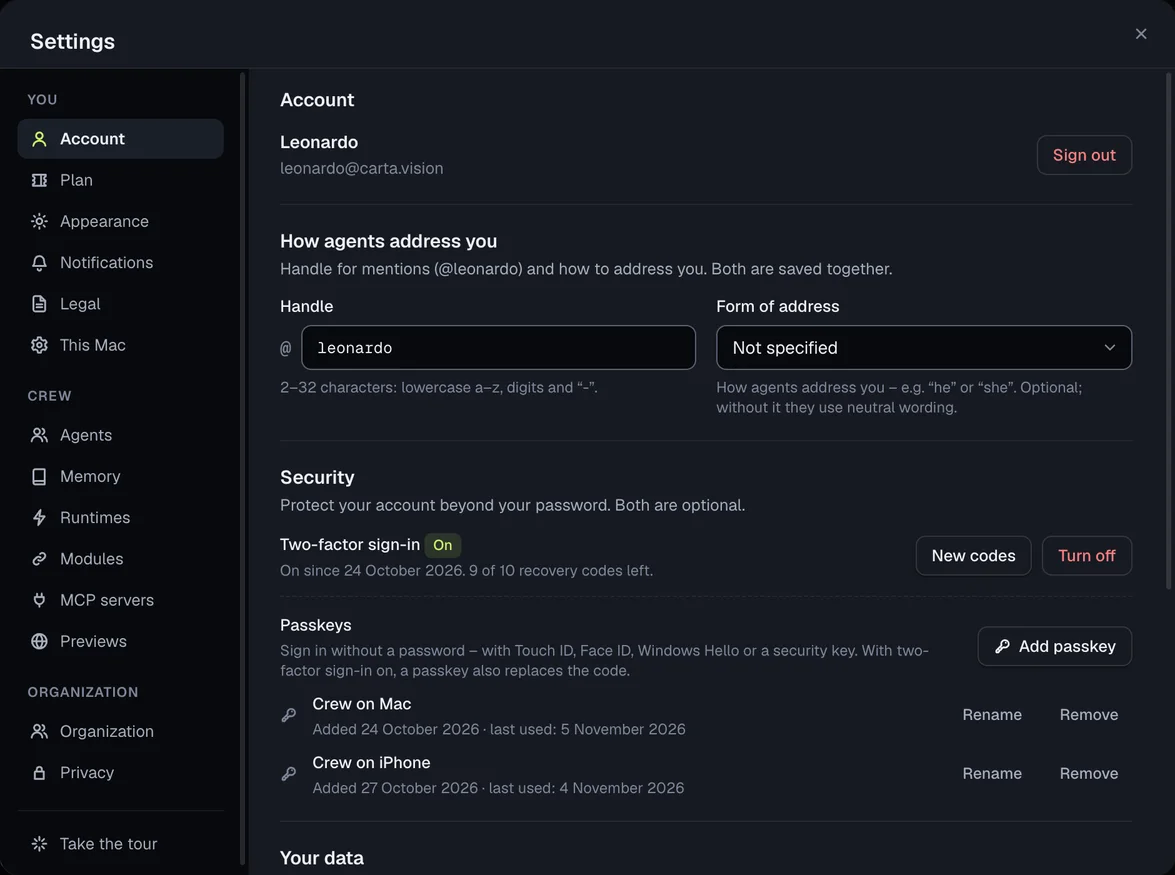
- Export my data downloads a copy of everything Nema stores about you: profile, organizations, agents, channels and messages, attachments, runs, emails, reminders, connections (without passwords and keys) and your workshops. The link is also sent by email.
- Download workshop downloads the files of the current context's workshop.
- Delete account … deletes your account permanently, on all devices and on the server. You confirm with your email address; running plans are cancelled. If you are the only owner of an organization with other members, hand over the role first.
Legal texts
In the app you find them under Settings → Legal, together with your consent and the app version. When the terms change, the app asks for your consent.