
Every agent has its own AI, the runtime. You choose it when creating the agent and can switch it later in the profile.
- Nema runs on your Nema credits. You need no further account.
- Claude Code and Codex run on your own subscription with Anthropic or OpenAI – without an API key. The sign-in stays in your isolated container, not in Nema's database. They use no Nema credits.
In an organization, an owner or admin has to approve Claude Code and Codex once.
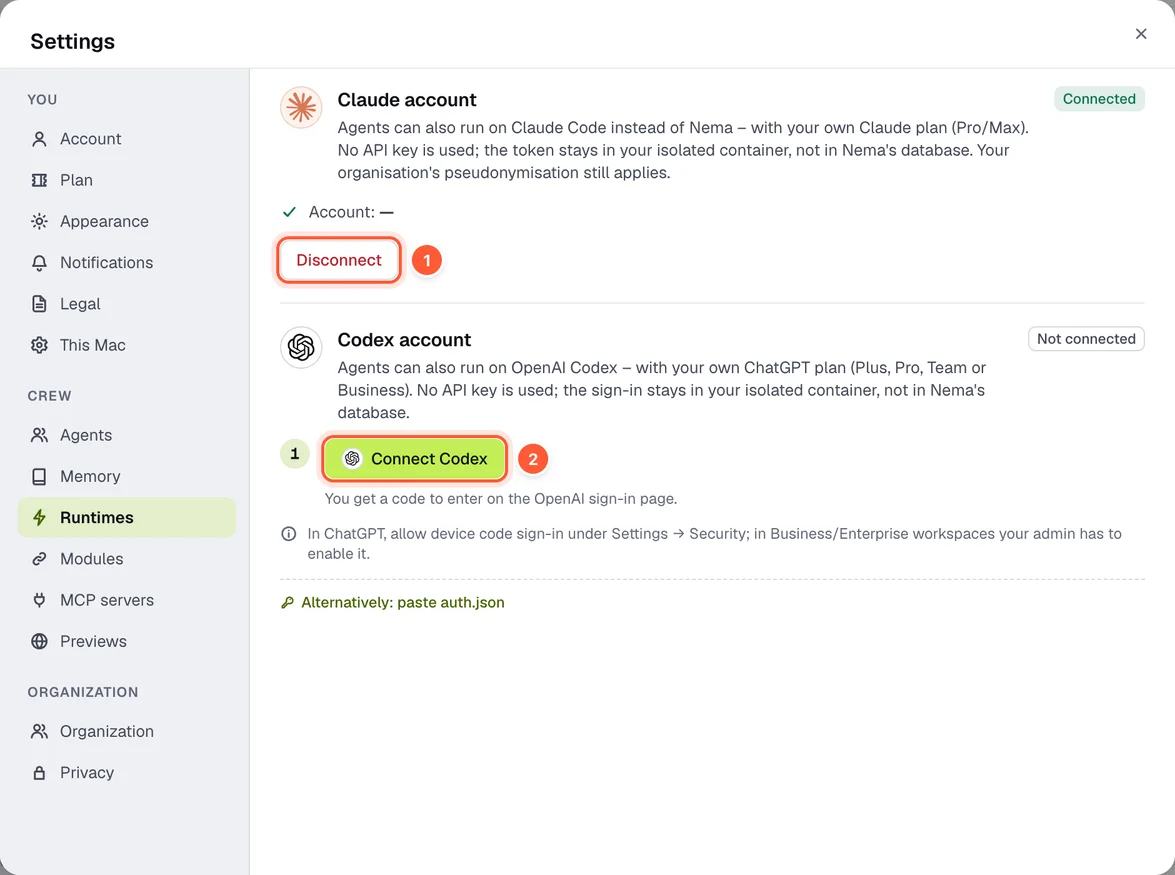
- Disconnect – sign the Claude account out
- Connect Codex – get a device code
Connect Claude
Under Settings → Runtimes → Claude account (or right in the wizard for Claude Code):
- Sign in with Claude opens the browser.
- Sign in to Claude. Claude shows a code.
- Paste it under Code from Claude and tap Confirm code.
Alternatively you can paste a token created by claude setup-token. You need a Claude subscription (Pro or Max). Claude Code shares its limits with the Claude chat.
Connect Codex
- Connect Codex shows a device code (valid for 15 minutes).
- Open the sign-in page and enter the code – on any device, including your phone.
Requirement: device login is allowed in ChatGPT under Settings → Security; on Business and Enterprise an admin has to enable it. Alternatively you can paste the file auth.json. You need a ChatGPT subscription (Plus, Pro, Team or Business).
Disconnect
Disconnect signs the account out. Agents of that runtime pause until you connect again.
What the providers see
Pseudonymisation works the same in all three runtimes. Exception: side calls from Codex to OpenAI, for example about the account and settings, don't go through pseudonymisation – they contain no conversation content.