
With the Model Context Protocol (MCP) you connect tools for which there is no module – for example an internal server of your company. The tools are then available to the chosen agents, whether they run on Nema, Claude Code or Codex.
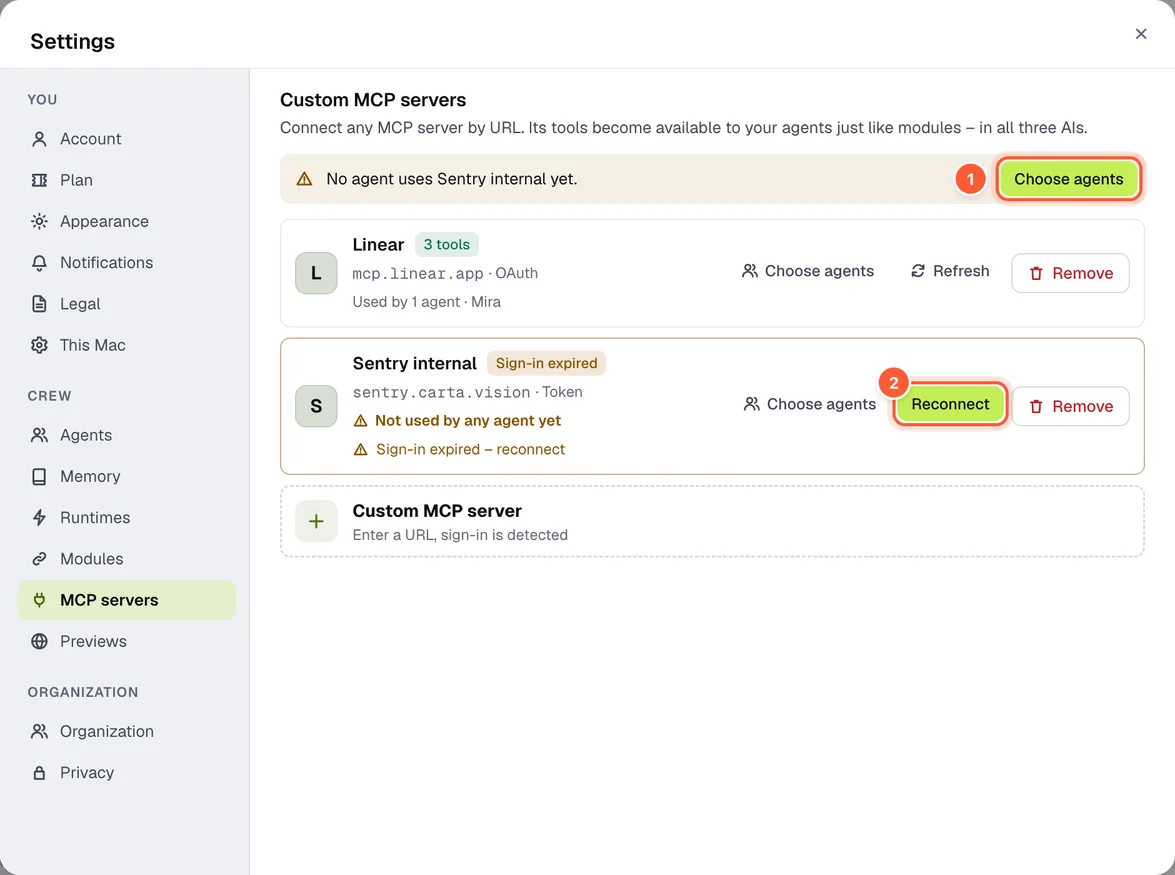
- Choose agents – who may use the server
- Reconnect when the sign-in has expired
Connect a server
- Settings → MCP servers → Custom MCP server (or the tile in an agent's “Modules” step).
- Enter the Server URL – Streamable HTTP (
…/mcp) or SSE (…/sse), https only. - Nema probes the server and detects the sign-in method itself:
- OAuth in the browser – you sign in with the provider. If the server doesn't support automatic registration, you enter your own client ID.
- Token (API key) – sent as a header.
- open – no sign-in.
- Which agents may use ‹server›? – pick agents, Apply.
Only your own agents can use the server, because the sign-in is yours. Tools can be blocked per server. Agents on Claude Code or Codex start a fresh session afterwards so they see the new tools.
If a sign-in expires, the server says so – Reconnect. Remove disconnects it.
Privacy
What an agent sends to the server goes there with the real values. What the server returns is pseudonymised before the AI sees it – if pseudonymisation is on for this server (Settings → Privacy → MCP servers, switchable one by one).